How to Clean a Toaster Safely: Crumb Tray, Slots, and Exterior
Quick answer: For routine cleaning with dry, safe access, cancel the cycle, unplug the toaster, and let it cool. Empty the owner-accessible crumb tray; wash or wipe it only as the exact manual allows. Release loose crumbs by the approved method—brushing and inversion are not universal permissions. Wipe the exterior with cleaner on a cloth, never sprayed into slots. Keep water, fingers, and utensils out of the slots. A wet or damaged plug, electrical smell, sparks, or ongoing smoke calls for a stop, not a deeper clean.
A crumb tray handles only part of the buildup. Crumbs can sit on ledges above the tray, melted toppings can bond to slot guards, and grease can collect around controls. The safe approach separates removable dry debris from a fault that cleaning cannot fix.
Updated October 22, 2026: clarified model-specific tray access and slot brushing, safe handling of a jam, water-entry and electrical-fault stop conditions, and the checks before normal use. Replaced a broken source link; the earlier care guidance was checked October 20.
Choose clean or stop · Follow the cleaning steps · Check the result
Decide whether to clean or stop using it
Flames or heavy, continuing smoke? This is not a cleaning task. Do not reach through smoke to unplug, carry or invert the toaster, or pour water into it. Get everyone outside and call 911 from a safe place; stay out. The U.S. Fire Administration’s fire-safety guidance says to leave and call for help when in doubt about a cooking fire.
| What you notice | Best next step | Why |
|---|---|---|
| Loose dry crumbs and normal operation | Empty tray and release crumbs while unplugged | Routine maintenance |
| Greasy or sticky crumb tray | Wash the removable tray only if the manual permits, then dry completely | Water must not enter the toaster body |
| Bread or pastry lodged near the top | Unplug, cool, and use only the manual-approved removal method | Metal tools can contact energized or fragile elements |
| A past burnt-crumb smell, now cool and unplugged, with no damage or electrical symptoms | Remove the accessible debris using the manual, then complete the result check below | Crumbs are one possible cause; disappearance of an odor is not proof of electrical safety |
| Sparks, melted slot, damaged cord, persistent burning odor, or smoke from a clean toaster | Keep it unplugged and replace or service it | Cleaning is not an electrical repair |
Time estimate: 10–20 minutes plus complete drying of any approved washable tray. Difficulty: easy for owner-accessible parts only. Tools: waste bin, soft cloth, and mild dish soap only for an approved washable tray. Add a dry soft brush only if the exact toaster instructions permit its intended use.
Electrical boundary: With dry hands and safe access, unplug before moving, tilting, brushing, or wiping. Cancel is not power isolation. Do not handle a wet, scorched, damaged, or abnormally hot plug or socket; keep away and get qualified help. Never immerse the body, rinse a slot, spray cleaner inside, or touch an element. A damaged cord, melted housing, repeated sparks, or unexplained smoke means stop using the appliance. A loose or damaged outlet also needs a qualified electrician—not a toaster-cleaning fix.
Step-by-step: tray, slots, and exterior
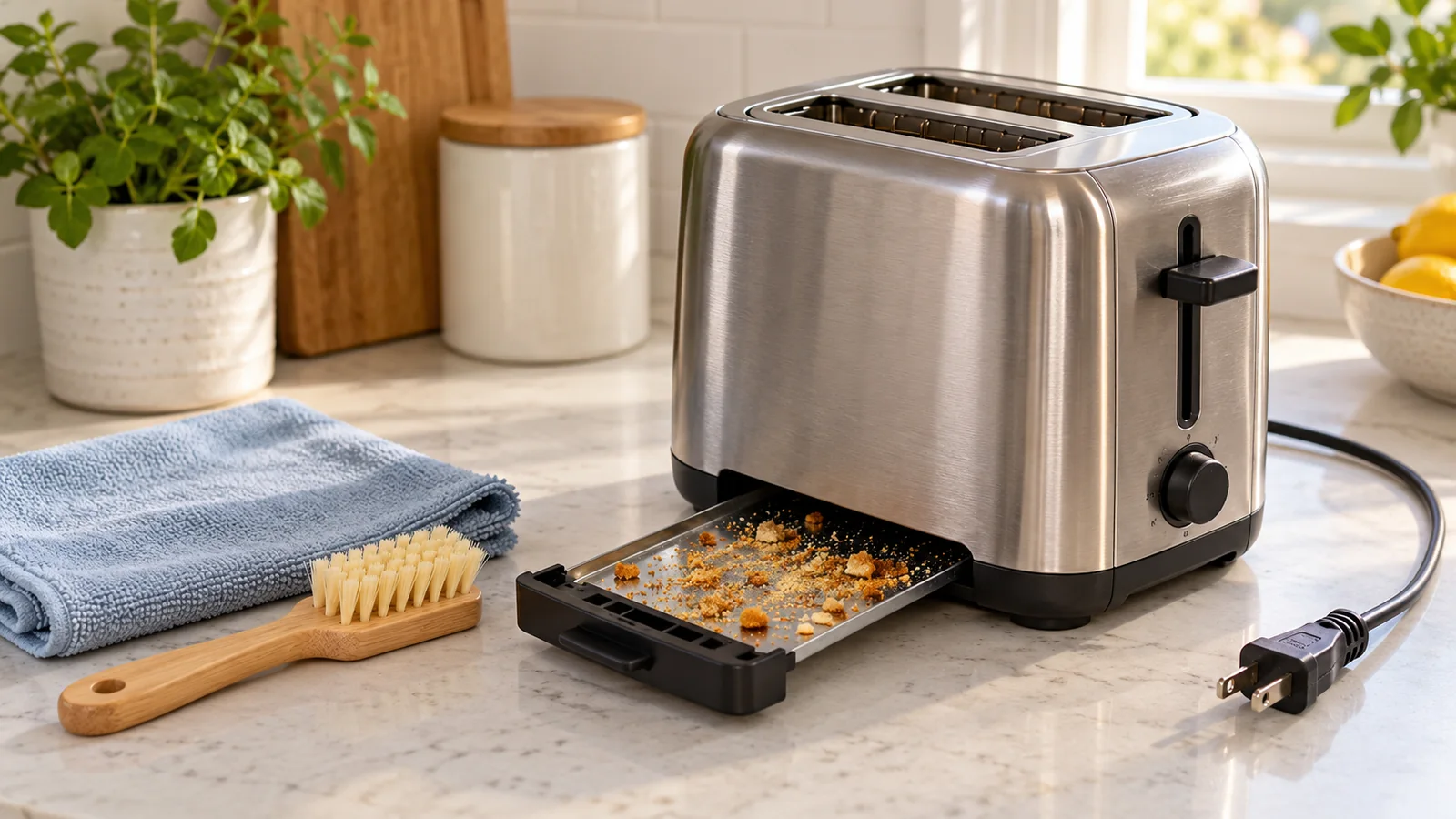
- Disconnect only with safe access, then cool. For ordinary maintenance with no warning signs above, cancel an active cycle and unplug at the wall by the plug, not the cord. Wait until all surfaces are cool. Work on a dry counter near a bin, away from the sink.
- Identify the tray before pulling. Use the manual’s owner-cleaning diagram: a slide-out tray is withdrawn by its handle, but a hinged crumb door opens by its specified release and stays attached. Do not force a panel or undo base screws, feet, or electrical covers. If the access method is unclear, ask the maker before proceeding. Photograph the tray orientation if helpful.
- Empty the accessible tray. Tip loose crumbs from a removed tray into the bin, or follow the manual for an attached crumb door. Wipe the tray as directed; do not shake debris back toward the slots or use a brush inside an unidentified opening.
- Check wash versus wipe-only. Do not decide by the tray’s metallic appearance. Some manuals permit hand washing in soapy water; others specify a damp wipe. Keep an attached door out of the sink. Wash only a removed part explicitly approved for it; rinse off soap and dry both faces, edges, handle, and seams fully. Dishwasher use needs separate, explicit permission.
- Release loose interior crumbs. With the tray removed and the toaster unplugged, hold the unit over a bin. Gently tilt or invert it only if the manual permits. Do not shake hard, bang the housing, or bend the slot cages.
- Skip slot brushing unless your manual permits it. A pastry brush or toothbrush is not automatically safe inside every toaster. Where the maker explicitly allows a dry soft brush, follow its permitted reach and method without touching or scraping elements. Otherwise stop at the approved tray and loose-crumb method; do not probe deeper or improvise a tool.
- Wipe the body. Put mild cleaner on a cloth. Use a barely damp cloth around the lever, buttons, housing, feet, and cord exit, then dry immediately. Follow the grain on stainless steel.
- Refit or latch the dry tray correctly. Follow the original orientation and the manual’s closure method. Confirm it is secure without force. Do not operate with the tray missing, partly open, bent, or unable to latch.
Why the model gate matters: Dualit permits a soft brush for loose crumbs, while Cuisinart’s linked instructions prohibit hard or sharp implements. Hamilton Beach’s older 840009800 care sheet shows a swing-open crumb tray, unlike a slide-out design. For tray cleaning, KitchenAid describes hand washing, whereas Russell Hobbs’ UK guidance describes wiping and drying. These are examples of different instructions, not interchangeable directions for your toaster.
How to handle stuck bread safely
Leave the toaster unplugged and cool. Follow its documented jam-removal method: remove or open the tray and use gentle inversion only when that model allows it. A wooden or plastic utensil is not a universal safe substitute for a metal one. Use a tool only if the exact instructions explicitly permit that tool and method; never force the bread or contact the elements. If removal needs probing, force, panel removal, or soaking a stuck sugary filling, stop and contact the manufacturer or arrange replacement.
Do not toast buttered bread, cheese-topped slices, frosted pastries, or other foods that can drip unless the toaster instructions explicitly allow them. A toaster oven may be the intended appliance for those foods.
Exterior care by finish
| Finish | Start with | Avoid |
|---|---|---|
| Stainless steel | Soft cloth with mild soap; wipe with grain and dry | Chlorine cleaner, steel wool, or cross-grain scrubbing |
| Painted metal | Barely damp soft cloth | Abrasive powder or harsh degreaser |
| Plastic controls | Cleaner on cloth, then immediate drying | Solvent, alcohol unless approved, or liquid in button seams |
| Chrome trim | Mild soap and soft cloth | Scouring pads that leave permanent scratches |
When smoke means crumbs—and when it does not
- A little smoke with visible food debris: stop the cycle and disconnect only if the controls and plug are safely accessible and dry. Let it cool before the manual-approved debris removal; do not tip or clean a hot, smoking unit. Escalate to the fire boundary above if smoke continues or flames appear.
- Smoke from oily or topped bread: stop using that food in the pop-up toaster; clean only after cooling.
- Smoke after a full crumb clean: leave unplugged. Hidden residue or an electrical fault may require service or replacement.
- Sparks with no foreign metal: stop immediately. Do not repeat the cycle to “test” it.
- Burning odor from the cord or plug: do not handle a hot, wet, scorched, or damaged connection. Stop use and have the appliance and outlet assessed; do not remove an outlet cover or repair wiring yourself. The U.S. Fire Administration advises replacement of appliances with damaged cords and outlets where plugs no longer fit snugly.
Follow the manual’s schedule, with earlier crumb checks
Start with the exact manual’s maintenance schedule, then check sooner with frequent use, crumbly bread, or crumbs around the base. Do not wait for a pile of debris, a burning smell, or smoke. For example, KitchenAid’s cleaning guide recommends emptying the tray after each use; that is not a replacement for another model’s instructions. Wipe exterior splashes after cooling and unplug the appliance when not in use.
The check before normal use
For routine maintenance only—with no water entry, damage, or fault history—check that all cleaned parts are fully dry, the tray or crumb door is secured, no tool or cloth is nearby, no accessible food remains, and the cord and plug are undamaged. Keep the toaster upright on a dry, heat-resistant surface with the manual’s clearance from cabinets, towels, and other combustibles. Then choose the relevant outcome:
- Routine crumbs removed, no fault signs: return to the manual’s normal operation, supervised. Do not run an empty cycle to dry the appliance or burn off cleaner. If smoke, sparks, or electrical odor occurs, stop use. Disconnect only when the plug is safely accessible and undamaged.
- Food is still stuck or the tray will not secure: keep unplugged and ask for the approved next step or correct part. Do not keep cycling to burn away a jam.
- Liquid entered the body, controls, or plug—or there was electrical damage: do not reconnect to see whether it works. Surface dryness or overnight drying is not a safety clearance; get manufacturer or qualified service advice. ESFI warns that water-damaged electrical equipment needs evaluation before power is restored; its disaster guidance is not permission to reuse an immersed toaster.
Frequently asked questions
Can I use compressed air?
Not unless the manufacturer directs it. Air can drive crumbs deeper, damage elements, or spread debris across the counter.
Why will the crumb tray not close?
Check its orientation and remove crumbs from the track. Do not force a bent tray or housing; an unsecured tray should be replaced with the correct model-specific part.
Related kitchen maintenance
- Clean a microwave cavity, turntable, and filters safely
- Descale an electric kettle without wetting electrical parts
- Choose a safe oven-cleaning route by liner and cycle
Sources
- KitchenAid US — Toaster tray care, exterior cleaning, and maintenance
- Cuisinart CPT-780 — European model example, not US electrical or warranty instructions (PDF)
Care guidance checked October 20, 2026; safety, tray-access, source links, and completion decisions rechecked October 22, 2026. This guide covers pop-up toasters, not wet-cleaning a toaster oven. Crumb-tray washing, inversion, brush use, and serviceability vary by toaster; the current manual for the exact model takes priority.